Followers

Showing posts with label Google. Show all posts

Saturday, January 28, 2017

Powered by Passion: GEG ILs

Last year, way back in November 2016, teachers of languages got together in Tel Aviv to kick-start a new Google Educators Group in Israel (GEG IL) for teachers of languages. The goal was to  organize  teachers of all and any language in Israel to share, explore, innovate and learn how to harness the power of the digital tools we all have at our fingertips, to further our teaching goals.  

After we saw that we had an enthusiastic population with whom to work, WE got to work! “We” meaning four of us, who were Google Teacher Academy cohorts and one extremely talented teacher who had not been through the GTA but is no less capable in digital pedagogy, as well as the Google-communities’ leader. We dreamt, planned, scouted venues, hungout, emailed, and Googledoc-ed our fingers off, putting our heads together to set up the regional meetings.

Fast forward to January, when we convened in the different areas around the country.  Most of us managed to hold our get-togethers on January 19th; the Jerusalem crowd met on January 5th. Altogether we brought in around 40 teachers of languages who have a passion for teaching, learning, languages and digital tools. OK - we were hoping for a larger turn out, but since one of Google’s Eight Pillars of Innovation is “Think big but start small”, I see the fact that 40 teachers were willing to leave their cozy homes on a wintery afternoon, after a long day - a long WEEK - at school, without getting points or remuneration, as an encouraging achievement. And from the feedback we received, I believe we’ll be seeing them again.   

Each of the venues took things in slightly different directions, but kept some of the activities in common.

In Jerusalem, since Google-star Irit Merchav co-leads another GEG with the unstopable Yair Farby, for educators of all different subjects, she incorporated her Jerusalem Teachers of Languages branch, into the bigger meet-up, on the 5th.

In Haifa, the talented Leah Doryoseph brought her teachers together for a slightly abbreviated meet up (time constraints of her Pisgat Haifa venue) making it short and concise, yet efficiently leaving her participants looking forward to more.

Rania Essa, a superstar on YouTube in her own right, with tons of clips which can be used for teaching English  (Google her!) had the largest group in the matnas in Kfar Kassem where, in addition to playing languages bingo, she gave her group of Arab and Jewish participants the opportunity to experience a rich collection of  apps for language learning.


Together with Hanan Perlman, we brought our GEG IL to the Western Negev, in Sderot, to a magical venue! Our get together was held in a meeting room which can only be accessed by traversing a colorful indoor, rocket-proof  playground, generously built for our region by the good people in the JNF, and warmly hosted by Shmuel Ochayon and his dedicated staff from Sderot! We began with a QR Treasure Hunt, for which our participants had to sprint between the swings and the bouncy castles, in search of the treasures (which were the 8 Pillars of Innovation …. but we didn’t tell THEM what they were - otherwise they could have just Googled them and found them without running around ;-) .


QR Treasure Hunt in Sderot:


Following their jaunt around the playground, the culturally diverse teachers (including Jewish and Bedouin, English and Hebrew language educators) discussed the relevance of the different Pillars that they found, to their work as teachers of languages. They played “Languages Bingo” (discovering that there is more than one way to translate with Google Translate…. including cameras and handwriting!) talked about their needs and dreams, and then virtually met other branches of our community: the participants in the Kfar Kassem group, Leah - the leader in Haifa, and Yael - Israel's Google Education Lead, excitedly interacting in real time over Google Hangouts).


Google Hangout:


A few of the common threads between the different venues were a desire to connect and share, to build and develop activities together, then tailor them to our individual needs. To  learn how to support each other. The need to commit.


Here’s a taste of what went on in the different venues, courtesy of Rania’s clip-making skills!


The atmosphere was totally uplifting and it was an inspiration to see others, like us, so passionate about the joy of thinking and learning together, to build a community of teachers of languages who yearn to harness the power of digital pedagogy for their educational purposes.

We would love to have YOU join us! Remember: this is NOT exclusively for English teachers - even though I am writing this in English - it is for teachers of ALL languages! You are all invited to join our Facebook Group to stay in touch and updated! Invite your colleagues who teach other languages! If you are willing to join the lead team, we will help you open a branch of our community near you! Together with the other leaders of this community, we will be working out the details and planning future meet-ups around the country!

To those teachers who joined us in Jerusalem, Haifa, Kfar Kassem and Sderot: thank you ALL for putting your trust in us, jumping, into the deep end and starting to swim.

And a final “thank you” to Bar Umansky (our GEG IL beacon) and Yael Doron Drori - the Google Education Lead in Israel!

Digitally yours,

@dele


Saturday, April 11, 2015

Googleforms solve ALL of my problems - here's just one of them

Well, not REALLY all of them... but they DO help me deal with many challenges I have as a teacher, and by now, I find them absolutely indispensable. So if you are tired of hearing about the wonders of Google, do NOT continue reading.

But, if you ARE an EFL high school teach in Israel, and you are teaching the literature program, need to grade Logs and are interested in reading about how I am using Googleforms to help me with that, do read on. 

In the program for teaching literature in Israeli high schools, we need to teach six units of literature, and give a grade for each unit, according to the following calculation*:

  • 20% for organization (including all work for the Key Components of teaching literature, handing the work in on time, organized in specific order)
  • 30% for the graded Key Component
  • 50% for Summative Assessment (final test on unit)
(*NOTE for Israeli EFL teachers reading this, these percentages are only for students doing the literature program in the 11th and 12th grades this year. For 10th graders, percentages are different, but the principle of this use of Googleforms remains the same)

It is always a major job grading and keeping track of all this work. Grading just one unit for a class of 31 students literally takes days. So anything I can find to help me make that task a little more efficient and expedient, makes me happy.

This Passover vacation I had 31 units of work for a short story, to grade. In order to do so, I made a Googleform! On it I listed all of the elements and pages I required for each unit of work, as well as a place for the grades and a short description of the graded task the student chose to do. It looks like this:


As I read through each portfolio of work, I just tick off what is there, and what is not. Fill in the form and I have all of the information in one, easily accessible place. This is what the collection file (Responses sheet) looks like:


If you noticed in the Googleform, above, some of the fields are mandatory (they have a red asterisk next to them) and others are not (for example the last three are NOT mandatory). That is because the students have not taken the test yet. When they do, I will just go into the spreadsheet (Responses sheet) and add those grades in. I can also easily keep track of who handed work in late, with the automatic time stamp, in the first column.

As with excel, I can insert the equation for the final grade into the sheet, and then: voila! Final grades will be calculated, automatically!

Do YOU use Googleforms in unexpected ways to help YOU organize YOUR work or life? If you do, please share!

Digitally yours, 

@dele

Saturday, November 15, 2014

Gmail's New Inbox... is it worth it?

EVERYBODY is screaming for it…. but do we know why?


I love Google. And I hate to say it, but I practically LIVE within my Gmail. I am a completely dedicated and devoted Google-related user (as anyone who reads my blog doubtlessly knows) and will never hesitate to try out something new. Admittedly, Google are the kings of hype. If my memory serves me well, in order to get Gmail in the first place, you had to be invited by one of the “honored” early adopters. Well, the hype is again in the air, with the onslaught of the new Inbox.  


So here’s the deal: beginning in the summer, Google started rolling out the new Inbox, which is supposed to organize your gmail in a way that will make it more convenient to stay on top of things. However the catch is, you need to be invited in order to get it. I’m not sure why they are doing it this way, aside from it being a marketing gimmick that makes you WANT what you can’t have (by “can’t have”, I mean that you can’t just download it whenever you want).


Embarrassingly enough, the technique worked. I fell for it (finding myself desperately BEGGING anyone I knew in my Google milieu, to share it with me, practically willing to give up my first-born grandchild just to get my hands on it…. but not altogether sure WHY). Another colleague, (with whom I shared an invite today) wrote:I was feeling like the five year old who was busy playing at the party and missed out on the birthday cake :)  I hope I find the icing on the cake worth the effort.. but at least I don’t feel so rejected anymore."


As if the frenzy inciting weren't working well enough, there was one day, about a week or so ago, when Google announced that anyone who wanted could write inbox@google.com during a small window of opportunity of one hour ("between 6 and 7 pm ET time") - sort of like a Black Friday on steroids

I am not quite sure why the giants at Google feel they need to do this kind of promo stunt. I think they're pretty great without all the need to use artificial ploys to draw people in.....but what do I know? Anyhoo.....

A day or so after you finally get the much coveted “Inbox”, you get “invitations” (they are colored yellow - like the “golden invitations” reminiscent of “Charlie and the Chocolate Factory”..not sure if that was intentional, but I’ve seen others who had that association as well). I didn’t get my invitations immediately, and was a bit confused, since people are asking for them all over the place, and I thought I had misunderstood how to send out invitations, but they showed up after a while. The first time I got three invitations  to share, the next time (about 5 days later) I got five. Apparently, for now, they renew themselves weekly on Wednesdays or Thursdays (according to one of my go-to Google guys, Eli Dori).


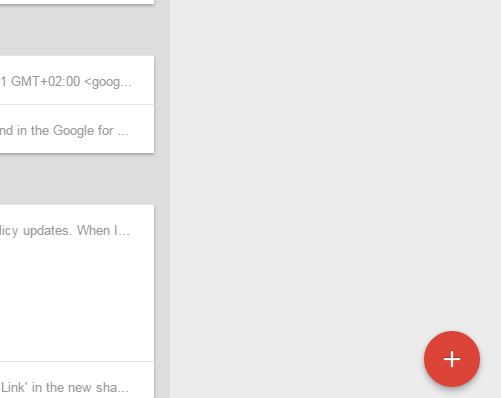
When you get it, you will see a red circle with a + on it:

Invitations to inbox 1.JPG


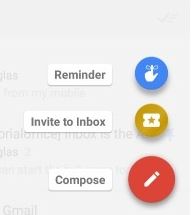
Clicking on the red circle opens more circles which show you a red circle for composing a new email, a golden one for invitations, and a blue one for reminders:


Invitations to inbox 2.JPG


Above those you will see the three email addresses to whom you write most frequently. 

You can use the new Inbox both on your phone as well as on your computer.


So what have I found so far?


I’m NOT in love with it.


Here are MY pros and cons SO far:


Pros:
  1. It’s clean - when I use it on my phone, it is easier to see the things that have come in most recently.
  2. Inbox uses something called “Bundles” which groups emails of the same category, together. There are a few default Bundles and the thing that is convenient about it is you can add your own.
  3. The “Reminder” feature lets you add a reminder about something in general (not necessarily an email -related)  that you want to pop up at the top of your Inbox whenever you tell it to (like tomorrow morning, at a time when you know you will be at the computer). There are other applications that will do this, but there is something useful in having it built into your email.       
  4. “Snooze “ button  - like on an alarm clock - it lets you get on with other stuff without worrying that an important email that just came in, will get buried under the pile by the time you have time to deal with it (which happens to me ALL the time!).
  5. Pin an email that is important. On the top toolbar there is a little icon of a push pin. When it is “off”, you see all of your Inbox, (as it is arranged in Bundles). When it is “on” it shows only those items which you have pinned. Once you deal with a pinned item, you can remove it from your “pinned” list.  


unpinned.JPG


Pinned.JPG


Cons:
  1. The formatting option of writing an email within a thread when using Inbox, seems to be limited. When I tried to respond to an email in Hebrew (right -left orientation) and insert a word in English (left-right orientation) the directions got all jumbled up, and I was unable to access the formatting functionality.
  2. Gmail has a lot of nice apps that do not seem to transfer into the Inbox (for example, I have a feature that I could not live without any  more - called “Undo” which delays the sending of an email for as many seconds as you set (mine is set to 30 seconds) so it lets you change your mind and recall an email if you want to fix something in it (or are having second thoughts about what you wanted to write to that person who ticked you off….. etc)   
  3. Finally - and this is the BIGGEST “con”, for now.. I just don’t trust it. I feel that with the regular Gmail view, I have pretty good control over what is going on...I get the “big “ picture most of the time, when I am in working mode, near a computer and get to check my mail every hour or so.


I am not giving up on Inbox - I have installed it on my phone, and am using both layouts for now. I’m trying to benefit from both “worlds” by using the features on it that I like, (it seems that there are lots of ways I can prevent myself from forgetting to deal with emails) but not giving up on the view I am used to, altogether, at least not yet.


In fact, now that I think of it, a while back, Google tried to change the way the Inbox looked by added a tabbed view. I did NOT like that change- and for my most used Gmail accounts (yes - I have numerous) I reverted back to the regular view. I’m guessing there were other people who didn’t buy into it either, which might be the reason for adopting a marketing gimmick that will make it more attractive to people (at least in the beginning, to convince them to try it out in hopes they will fall in love with it).


If nothing else, at least this “get it from a friend” deal is probably generating lots more email (I admit - I HAVE been feeling more popular lately) and getting people to communicate with each other asking for invites! (In case you are wondering, I’ve run out of “Invites”, at least for now.)


Have any of you tried the new Inbox yet? Here is a short clip about it. What is YOUR opinion on it? Please share your insights here!

Digitally yours,

@dele

BTW: Inbox works only on private accounts for now - not on accounts that are through GAfE (Google Apps for Education). I have no idea why nor whether this will change in the future.