Just writing a "mini"blog post in response to talk on a program this morning, all excited about Siri - the built-in "digital assistant" on iPhones, now coming in Hebrew. But we've already GOT OK Google! And when one of the show hosts mentioned OK Google and the others hadn't heard of it, I decided that I MUST write about OK Google. So... what IS OK GOOGLE?
You know how when you are driving and you have to call someone but your hands need to be on the wheel? Or when you need directions? Or when you're baking and your hands are full of dough? Just say: "OK Google" and say what you need!
"Show me directions to get to 35 Ben Gruion Ashkelon" "How much is 3 ounces in grams?" "Where is the nearest supermarket?" "What's the weather forecast for Tel Aviv" "What is Purim"?
Try it with your students and see how it works for them! Maybe they need to work on their accents a bit to get it understanding them. Now THAT's a good thing! Besides - it understands Hebrew, too! Go into Google Play and Install Google Now to start playing around with it! Google now has a sense of humor, too! Try these, for a laugh (well..because..... PURIM! :0) Try these questions: 1. "What is the loneliest number?" 2. "How much wood would a woodchuck chuck if a woodchuck could chuck wood?" 3. "Who are you?" And my favorite: 4. "Do a barrel roll" Any ideas for how to use this with your EFL students? SHARE!!!! Digitally yours, @dele
We all know and love (or hate) Google Translate. As a teacher, I have seen more than a few Google-translated compositions that came out as gobbledygook. I constantly warn my students that I can smell a Google-translate composition from a mile away. I also moderate an international group on Facebook that aims at encouraging communication and empathy for others, yet when people with no understanding of English posted using Google Translate, it turned into mayhem and I had to gently explain the pitfalls of the application. It’s
simply that unless they know English well enough to communicate their ideas clearly, despite their good intentions, discussion process deteriorated into shouting matches.
Here’s just a sample of what can happen to the well-loved Bohemian Rhapsodywhen Google translate gets its teeth into it.
Funny - right?
But Google translate has a really important role in today’s shrinking world, where people move around more than ever before and need to communicate effectively. From the smallest request like finding the nearest public bathroom to an urgent need to locate the nearest drugstore in a foreign land when you have sprained your ankle and need to buy an ankle support, Google translate is an essential companion.
Google Translate uses algorithms based on statistical analysis. But as we all know, languages are tricky things, and despite the innumerable texts that the mechanism uses to develop the translations, it’s far from perfect. This is the reason why Google is trying to harness the Wisdom of the Crowds (first credited all the way back to Aristotle!) in order to improve its capabilities. And this is why a Google representative asked me if I could think of a way to get our students involved, to improve Google Translate for Hebrew.
At first I thought… nah…. why would my 12th graders, pre-occupied with tests, army call-ups, driving lessons and hormones, want to do that?
But then I thought… hhhmmmm…... It’s worth a go! It could get them thinking about language AND help others who need to use Hebrew!
In class, I showed the following explanationof how Google Translate works, and asked how many of them used Google Translate.
In fact, many of them use Morphix, but some use Google Translate…. Unless they were wary of admitting it ;-) . Then I gave them this article, anticipating their response: “English matriculation exams are coming up, and don’t waste our time on your techno-App-Web2-Googledocs-sites-Twitter bird brained ideas, Adele”. (FTR - it’s not easy being my student - they are often my guinea pigs, and they know me well enough after almost 3 years). I also prepared accompanying work (one NEVER knows WHAT subject is going to pop up on the Bagrut, and if anyone is listening out there, I would REALLY appreciate it if you could base module G reading passage or composition on using bots to translate, or something Googley similar).
I do not think they were the least bit suspicious at this point.
After they had all finished reading the article,if not yet all the questions, we started checking their work. I used a small squishy ball to keep them on their toes. I throw it to a person and they translate the next word or answer the next question. (They are always impressed at how well I catch ;-)
And then, when they hit the zone of being fuzzy and comfortable, I hit them with it.
Google Translate Community needs YOU!!!
Now, it was the end of the lesson, and they were itching to take a few minutes to look over their notes for their big history test the following hour, so I didn’t push the issue, but DID prepare them for the fact that they were going to be participating in a competition that will help our country (a little patriotism, here) and that there was a “to be continued” segment coming up.
But I CAN tell you that when one of my really strong students finished early I told her that we were going to have a competition, and I was going to let her try it out first. I instructed her to scan the barcode and start playing. She REALLY got into it! (But she is not representative of my class… nor any class, probably.)
The “to be continued” part will happen in class tomorrow.
I intend to have a short discussion with them about the nature of the problems with Google Translate, and to show the first few minutes of Adele’s “Hello”used with Google Translate (I believe they will be more familiar with it than the cool one I used to open this blog).
I want to hear what THEY think about the tool, how it can help them and then to demonstrate how THEY can help others, those who need to use Hebrew, or Hebrew speakers who need the English.Really - a little patriotism can go a long way in the 12th grade in my school ;-)
They will be told, in tomorrow’s lesson, that a portion of all the upcoming lessons until our Passover break will be devoted to spending 5 minutes to help the world communicate with us. They’ll be asked to go into the site and either translate or validate. At the end of the session, they will need to take a screenshot and send it to me in our class What’s App. There will be prizes for the top 3 scorers, and they will not be limited to class time to accrue badges!
So...what do you think? Will it catch on? Will it flop? Will I be stuck with all of the prizes?
Do YOU have any ideas for how to get kids turned on to thinking about language and translations AND helping others in the community at the same time? I would LOVE to hear about them!
And you can be sure I will share a follow up note here.
Digitally yours,
@dele
P.S. Here’s how to sign up for Google Translate. And here are some other ideas about how to take advantage of Google Translate for education and educators.
I'm excited and exhilarated, despite the late hour and the exhaustion of chugging into the end of a VERY long week (with three too many long rides into Tel Aviv). But I was at one of my favorite places there today, at one of my favorite learning opportunities: a Google Teachers' Academy alumni reunion at Google Tel Aviv. We heard about the hopes and plans of the people at Google, learned about what it is like behind the scenes at one of the world's biggest extravaganzas of taking advantage of the wisdom of the masses: Waze. Then we went for dinner. (As important as the presentations and lectures are, no less important is the schmoozing done between the sessions.) When we came back from dinner we were ushered back to our seats through a part of the hall that had earlier been filled with rows of chairs, now set up with tables and paper all over the place. We were told that we were going to experience one of the latest teaching trends. We were handed clear bags each containing a piece of colored plastic with holes in it, batteries, a box for a motor, assorted plastic paraphernalia, a gazillion rubber bands and some suspicious looking wires. We were told that we could scan a barcode that would show us an instructional video, but were encouraged to try and figure out for ourselves how to "go forth and build a Drawbot"!
I couldn't view the video properly on my phone, anyway, and I was chomping at the bit to crack this one on my own. It took a while, and I needed a few leg-ups along the way, but I finally did it! I looked at my beautiful (albeit wonky) DrawBot with pride, kvelling over the way it puttered along (even if it only moved in a straight line, rather than in graceful circles like the really "cool" ones did... a Bot only its mother could love). And then I looked up, and saw a room full of some 50 teachers all building and helping and laughing and watching their DrawBots -together and separately - draw a montage of mechanical drawings on the huge sheets of paper on the floor.
This is Maker Space. This is Maker Culture. This is when the magic happens. Can you imagine bringing this excitement into the classroom? I haven't processed the idea enough yet to figure out how to harness this energy and experience for the EFL classroom. I asked one of the presenters. He said: "It's all about language! Following instructions in English!" Hmmm.... but WE didn't bother to follow instructions. We preferred to figure it out. Why would our students? Still...... I have no doubt that there is great potential here. What do YOU think? How could this be used for EFL? You can find out more on their website: ForReal Digitally yours, @dele
Linoit is not new. In fact it's probably one of the first collaborative tools I learned to use.Last week's blog was about making (what I later learned was called) "Quote Graphics", for a Post-reading Activity for a literary text (in this case, we were working on The Road Not Taken). There I explained the process, and that the final products were to be uploaded to a Linoit. Then I realized, that I had never actually written a blog about Linoit! I have known (and loved) Linoit for at least 5 years, and sort of assumed that EVERYONE knows about it. But just so I am sure that EVERYONE in the WORLD knows about it (because everyone in the world reads my blog...hahaha... as if) I want to sing its praises! Linoit is an online tool that is a virtual bulletin board. On that board, people can post sticky notes, pictures, graphics and even videos. There are all sorts of fancy ways to use it, when all of the participants are signed in, but I usually use it the generic way, so that anyone who has the link, can post on it. Linoit has stood the test of time, because, unlike other applications that come and go, Linoit still ROCKS! And I can use it even MORE easily today than I could in the past, because ALL my students have cellphones! I used to use it with the students working from their computers, which limited it to either homework or when I would get the coveted computer room (not complaining - our school is well endowed technology wise... but still ... it meant I needed to be sure to plan in advance AND remember to get the computer room, and all for an activity that is really quite short). Since they all have cellphones, I can just have them do their task for the 5 minutes it takes to do it, show the results on the board (in fact, they really get a kick out of watching their notes appear) and then go on with other stuff.
You won't BELIEVE the things I use it for! First of all, with my students: When I first started teaching the class (when they were in the 10th grade) I used Linoit with them to introduce themselves. We also used it to send New Year's Greetings to each other. (I have since deleted those boards.... didn't know I would be blogging about them three years later ;-) That same year, though, I used Linoit with them for a pre-reading activity for teaching the poem Count That Day Lost:
This year, I used the tool as part of the process of teaching the literary term "Conflict". MOST of the class did the activity on the REAL bulletin board in the classroom, but those who were absent that lesson (and many were because of some other activity) were able to make it up at home, on this board:
In last week's blog, I described the activity I was planning, using cellphones and making the "Quote Graphics" as a post-reading activity. They went out, took pictures with their phones, used my blog to see what graphics programs they could used, and had a great time doing it! (I shared the link through our class What's App group.) They are still in the process of uploading them, but this is what they have done so far:
I also use Linoit in my counseling work. This year it was part of our winter Newsletter - sending greetings to each other from around the country:
And Lionit even helps me keep it all together when doing the very confusing and complicated task of organizing the oral testing roster for my region (designating which teachers go to test in which schools) (a system originally devised by my friend and colleague Judie Segal, using REAL Post It notes on a wall or huge window, but with this virtual version I have no worries that a strong breeze, frisky dog or mischievous cat might knock them off, making me scramble back to square one!
Here's a short, concise tutorial about more ideas for using Linoit and a quick "How to":
Have you ever used Linoit? Can you think of ways that it can help you in your teaching? Other aspects of your work? If so, please share! Digitally yours, @dele
I LOVE finding ways to have my students use their cellphones in the classroom. It engages them and relieves ME from having to remind them to "Put them away, or they're mine" (my students know my mantra, and finish the sentence for me.. and the punishment is that the phones get thrown into the "phone-jail" on my desk for incarceration until the end of the lesson.)
So any chance to use them for learning, is a chance well taken. I think most of us know what Pinterest is by now. (In case you do not, Pinterestis a social network that allows users to visually share, and discover new interests by posting (known as 'pinning' on Pinterest) images or videos to their own or others' boards (i.e. a collection of 'pins,' usually with a common theme) and browsing what other users have pinned.Jan 20, 2014 Defined by Google
I am pretty sure that lots of my students are familiar with Pinterest, and even if they are not, they are familiar with the Memes and other forms of communication that relies more heavily on graphics than words, from Facebook. It is not easy to get one's message across in a succinct soundbyte and graphic, so I thought that it would be a good skill to teach my students.
For my students' Post-reading activity for the poem The Road Not Taken by Robert Frost, I want them to make a pin for our class pinboard on Linoit. Their task will be to take a photograph with their phone camera, that will be appropriate for illustrating part - or all- of the poem. They will need to upload it to an application, add the line - or part - of the poem that it illustrates, and then share it on the designated Pinterest board. I figured it would be really simple to find a bunch of applications, since I had saved a blog about them. But to my dismay, when I went in to play around, I found that many of them were defunct (later I checked the blog, and saw it had been written in 2012... the relevancy of phone-based applications seems to be very short - as short as the life-spans versions of different phones (my beloved LGg3 is from August 2014, and I am already starting to feel its age :-( ).
I have played around with the following programs, and will recommend that they try them:
Font Candy works nicely but you need an iPhone for that, as far as I can figure. You can download it to your computer, with pretty nice results. This is what I made from my computer:
I made an example for them using PhotoGrid, but was not overly pleased with the ease of editing. (This tutorial shows how to make a collage, as well - but I did it with one photo and added the text.)
PicLab is another option, which worked quite nicely for me.
In the end, I am going to have them upload them all to a Linoit. They will also have to explain the reasoning behind their choice, to include in their log. Hopefully, the Linoit will soon fill up with their work! :-) I do NOT plan on using the Post-reading as the graded component for this unit, so I can just let them have fun, and I will get to feast my eyes on their pictures and quotes, and see their interpretations.
Do YOU use this kind of app with your language learners? If you do, please share how, in the comments, below! And if you have a tool that you find especially useful for this, I'll be HAPPY to hear about it!
Digitally yours,
@dele
Postscript: Well, I've just learned that they are called "Quote Graphics". Hat tip to Denise Wakeman. Now I have to go read her blog! ;-)
The summer is almost over (not that we teachers REALLY get to sit for two months under a beach umbrella with our legs up sipping a Daiquiri and reading a great book - although I DO think that that should count towards in-service teacher training... being well-read is an important quality for a teacher). Most of us will be heading back to our schools in the next few days for staff meetings, and to start preparations for a new school year. In order to keep track of what I have to do, I use Google Calendar. I would absolutely be LOST without it! (Ummm.....well..... no.... that's Waze..... I would be absolutely LOST without Waze.....but I would never remember what I need to do, and when, without my Google Calendar.) But that's for a different blog post. Since I no longer use the hard-copy calendar diary that we get at the beginning of the school year from our Teachers' Unions, I had to find something to replace the little pieces of paper that used to populate my calendar diary, (as well as my refrigerator door). Here are a few different ones I have tried (all have at least basic actions that are free). Any Do Any.Do lets you plan your day (it will pop up at a set time each morning and invite you to "plan your day". It lets you write your To Do lists, classify and label them, and will send you pop up reminders. When you miss a call, it will remind you later on that you had a call, and ask if you want to call them back, and if not now, then when (in an hour? this evening? tomorrow? next week?). I see now that it also has developed a desktop Chrome app, so that you can use it on the go, or in front of your computer. I had used it for a while, and, although it is no longer my app of choice, I suggest you look into it and play around. (I believe it is also an Israeli brain-child, so if patriotism is a selling-point...)
I had been using Out of Milk for a REALLY long time, and was completely happy with it. It is a very convenient way to make your shopping list. You can divide it into categories (stores, sections of supermarkets, whatever) and sync it. However the more advanced options (for example, sharing a list with someone or adding a photo) are not free, and the bar-code scanner (for adding something to the list using the bar-code) never worked properly for me here in Israel, anyway. Although the current version has become surprisingly graphically pleasing, let's face it: I really want to use an app that does more than just a grocery list.
Google Keep is currently my favorite go-to app for this purpose. I use it for my shopping lists, (and have shared that list with my son, so that if he wants me to get something when I go to the store, it's already in my list), and can even add a picture of something I want to get, so that I don't have to write a lot on the list, or describe it to the store keeper (the natural mosquito repellent in the brown bottle with the light blue and green label) I can just show the photo!
Google Keep syncs with my computer, so I can use the desktop view (below) OR the mobile view (above) on my phone. I make all sorts of notes of information that I need to find quickly (my license number, which dyscalculic me never remembers, the size of the windows I want to buy curtains for "someday") and - most importantly, my "To Do" list! There is an option of adding a reminder that will pop up to remind me to do something. It will even add a location reminder, so that if you want to do something when you are, say, in Ashkelon, the reminder will pop up next time you are there!
Desktop view
You can change the color of a note, add a label, add check boxes (and tick off a task when it's been done - then delete the "done" tasks). You can also copy a note to Googledocs, and further develop it there! If you are on the go, you can dictate and record your note. You can access it as a recording as well as a written note (because sometimes - especially when you dictate something with a Hebrew word or name - your phone won't know how to write it correctly - or it auto-corrects to something absurd- the fact that you have your voice recorded, can come in very handy to figure out WHAT you were thinking when you wrote that note! ;-) .) Thanks to the sharing option, you can use it to share individual notes with your family, or colleagues, or anyone with whom you wish to collaborate on something, and share "To Do" notes! All your notes sync to all of your devices that are signed into Google Keep (mobile, desktop, tablet). I haven't used it at work yet, but I can see the potential as being ENORMOUS! The only thing you (and whomever you want to share a note with) need is a Google account and to install the app. Once you have done that, you can share away! I might try it with some of my students this year! What I am actually hoping for is an integration between Google Keep and Calendar (something I see has been a pending request on the Google Help Forum, where they have been begging for for it for two years already). THAT would be PERFECT and solve ALL of the problems in my life (well... ok - maybe not the peace in the Middle East thing .... but you never know!) Google Calendar has "Tasks" (will address that when I write about Calendar) which is helpful, but not as superb as would be Google Keep + Calendar teamed up together. Do YOU have an app that really helps you keep track of stuff, and would like to recommend? Have you tried any of the ones I have written about here, and would like to add your opinion? Please feel free to write about them in the comments below!
From Pixabay
Have a GREAT school year! (And one last summer cocktail, on me.) Digitally yours, @dele
Each year our school has “English Day”, for the 7th and 8th grades. Each grade is on a separate day, and on that day the English Staff prepare activities based around an English speaking country, to help our students learn more about that country in an experiential, exciting way. The classes are broken up into groups of 7-16 students. Each group is given a name that has to do with something British. A teacher is assigned to accompany each group. Each activity has a scoring rubric, and the class that scores the most points at the end of the day, wins!
I am not going to go into the details of the organization of the English Day, itself. I will just mention that it is a humongous job, which can only be achieved through teamwork and a very dedicated and determined person on the staff to coordinate it.
This year’s English Day was about the UK, and I wanted to teach my groups about Sherlock Holmes. I also wanted to incorporate technology in a meaningful way (of course!)
Here was the scene:
Fact: Sherlock Holmes interviewed people, looked for clues and then tried to understand what the motive was for the murder.
Situation: Jackie Frisbee was found dead in the back of the classroom. The students had to find out who did it!
In pairs or threes, they had to:
go and interview two suspects
ask them 5 questions each and complete their chart.
take a funny selfie with the suspect (with a sign with the name of their group) and send it to me on their What’s App
try and guess what each person’s motive is
Then the pairs had to return to the scene of the crime (the classroom) and decide in their group - Who Dunnit?
The session started out by eliciting from the students what they know about Sherlock Holmes.
I then filled in any gaps with a presentation I made on Emaze (know it? You SHOULD! I’ll write another blog on it in the future)
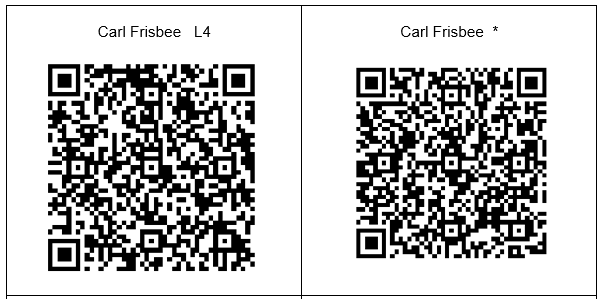
Each pair was given an Information Collection Sheet, and the names and phone numbers of two people who work in the school, and agreed before hand to participate. They had to call the participant to find out where they were, and then go interview them. The participating “suspects” (who ranged in status from teachers, the guard at the gate, to the principal and vice-principal) were given scripts with their fake names, the texted responses and were told that they could feel free to improvise, deciding how innocent or guilty they were going to look. They were also given two cards with barcodes that gave extra “secret” information!
Here was Carl’s text, for example:
What is your name?
Carl Frisbee
Guilty L4
How old are you?
17
What is your relationship to Jack?
Jack’s older brother
When did you last see Jack?
Right before class
Did you like Jack?
Only sometimes, he wasn’t the nicest person
Did Jack have any enemies?
Enemies? I don’t know, but I sure wasn’t his best friend.
Each of the pairs were supposed to interrogate two teachers, with overlap. For example, pair #1 went to interview Zmira and Rami. Pair #2 were sent to interview Rami and Moshe, and so on. That way they could gather and compare “evidence” (something that came in very handy especially when one of the teachers got the barcodes mixed up).
The barcodes had two different messages. The message for most of the time slots was something innocuous, the message for the time slot when THAT character was the guilty one, was more “sinister” Here is an example: The barcode on the left is the one that was shown ONLY during interrogations that took place with that character during lesson 4, the one on the right was for all the other lessons:
After the interrogation, the students had to send a photo with the “suspect” to my What’s App
The kids had a GREAT time running around the school, using their smartphones, talking English and trying to figure out which one of his teachers is the guilty one! (One of the parents told me that her son called her up in the middle of the day - something which he NEVER does - to tell her how much FUN he was having!!!! :-)
I'll admit that it was quite a lot of work, planning it all out (especially if you are as much as a perfectionist as I am) but definitely worth it !
Have YOU ever used barcodes and Whats Apps to do a Treasure Hunt? If so, please share!!!
Digitally yours,
@dele
P.S. Special thanks to Judie Segal for the inspiration, and the insight that “You’ve GOTTA have a dead body to teach Sherlock Holmes!!!!”